Many new merchants spend weeks perfecting their product and brand, but feel stuck when it comes to building their storefront. On one side, there’s the DIY route — using free themes like Dawn or Horizon. On the other hand, a polished (and expensive) Shopify store design service promising better conversions.
But this isn’t just about design — it’s about ROI. Do you really need to spend thousands to get results, or can you build a high-converting store yourself?
In this guide, we break down the real costs, the trade-offs, and a smarter middle-ground path that gives new merchants agency-level results without the agency price tag.
1. The Real Cost of “Free” — The DIY Reality
Most new merchants start with the DIY route to save capital for inventory and ads. That’s a smart move early on. But “free” often carries hidden costs that aren’t obvious until you’re already deep in the weeds.
The Learning Curve
Building a basic store is straightforward. Building a great one — one that actually converts — is a different skill set entirely. When you go DIY, you’re not just the business owner. You also become the UX designer, copywriter, and front-end developer.
- The Time Sink: Merchants who take the full DIY path can easily spend 40+ hours tweaking margins, font sizes, and button placement. That’s time taken away from marketing, product development, and customer acquisition — the activities that actually drive revenue.
- The “Uncanny Valley” of Design: Your store can look “off” even when you can’t pinpoint why. Common culprits include inconsistent padding, poor mobile scaling, low-contrast text, and a lack of visual hierarchy — all subtle trust-killers that push visitors away before they ever add to cart.
Performance vs. “Features”
Many DIY merchants try to replicate a professional setup by installing multiple apps — countdown timers, FAQ accordions, product sliders. But each app injects its own scripts, and this quickly leads to page bloat.
Page speed matters more than most merchants realise. Google’s research shows that a one-second delay in mobile page load time can reduce conversions by up to 20%. A slow store hurts your SEO before you even get organic traction.
2. What Does a Shopify Store Design Service Actually Offer?
When you hire a professional service, you aren’t paying just for a polished look. You’re paying for Conversion Rate Optimisation (CRO) expertise applied to your specific store.
Strategic Layouts
A professional designer understands user intent. They don’t just place a “Buy Now” button — they position it where the eye naturally rests after reading a benefit-driven headline. An agency typically focuses on:
- Reducing Friction: Making the path from homepage to checkout as short and frictionless as possible.
- Trust Signals: Placing reviews, security badges, and brand story content in the right positions — above the fold, near CTAs, and before checkout — where they have the greatest credibility impact.
Custom Coding
Standard themes are constrained by their built-in settings. A professional Shopify store design service uses custom Liquid and CSS to build features your theme cannot provide out of the box — such as a slide-out cart with upsell offers, a custom product comparison table, or a tiered pricing display for wholesale stores.
The Downside: The Entry Barrier
The results are often better, but the barrier is high. A reputable Shopify store design service typically starts at $3,000 for a basic setup and can exceed $15,000 for a fully custom build. For a merchant who hasn’t yet validated their product in the market, this is a significant financial risk — and rarely the right first step.
3. The “Middle Ground”: How to Get Agency Results on a DIY Budget
If you’re aiming for a more professional, high-converting layout, you don’t need to invest thousands in a design service — and you don’t need to spend weeks trying to squeeze results out of a base theme.
Several professional Shopify agencies already use pre-built sections to speed up their workflow and maintain design consistency across client stores. The same approach is now available to independent merchants.
A Practical Choice to Customise Your Store
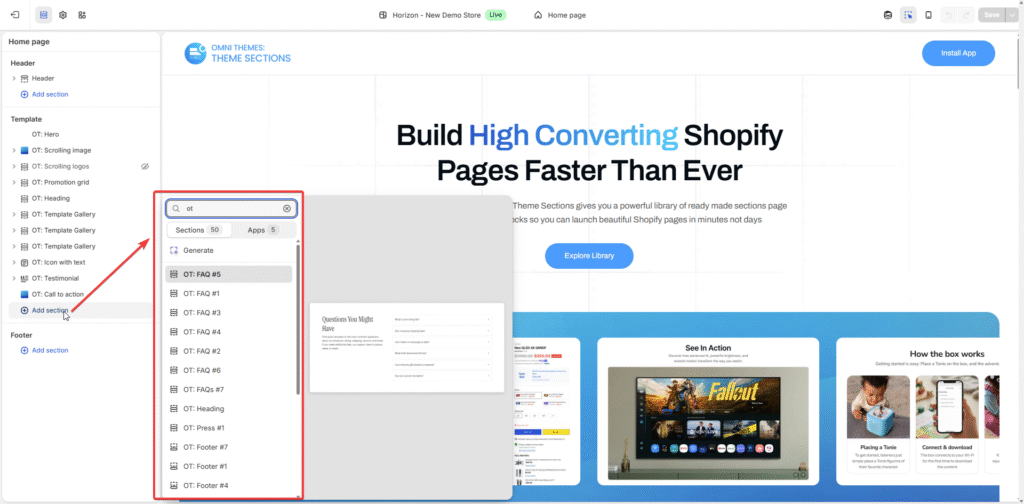
A growing category of Shopify apps — called theme section apps or section library apps — extends your existing theme with ready-made design blocks you can drag, drop, and configure directly inside the native Shopify Theme Editor. No code, no extra page-builder platform, no switching tools.
Instead of rebuilding your store from scratch or paying an agency to do it for you, you simply add pre-designed sections — hero banners, testimonials, FAQs, product showcases, and more — and arrange them to fit your brand. The sections are built to be lightweight, responsive, and conversion-focused from the start.
One example of this approach is OT Section: Theme Sections, which gives you 200+ professionally designed sections, templates, and blocks — all accessible from inside your Theme Editor. No design skills required, and no bulky apps that slow your store down. You get a professional page-builder experience with sections built specifically for performance and usability.
Whether you’re in dropshipping, branded products, or content-driven e-commerce, you can:
- Add high-impact hero sections to highlight your main offer
- Showcase testimonials and trust signals in structured, credible layouts
- Include interactive elements like FAQs, videos, or shoppable image grids
- Reuse sections and templates across multiple pages to keep designs consistent and save time
Why This Approach Works for New Merchants
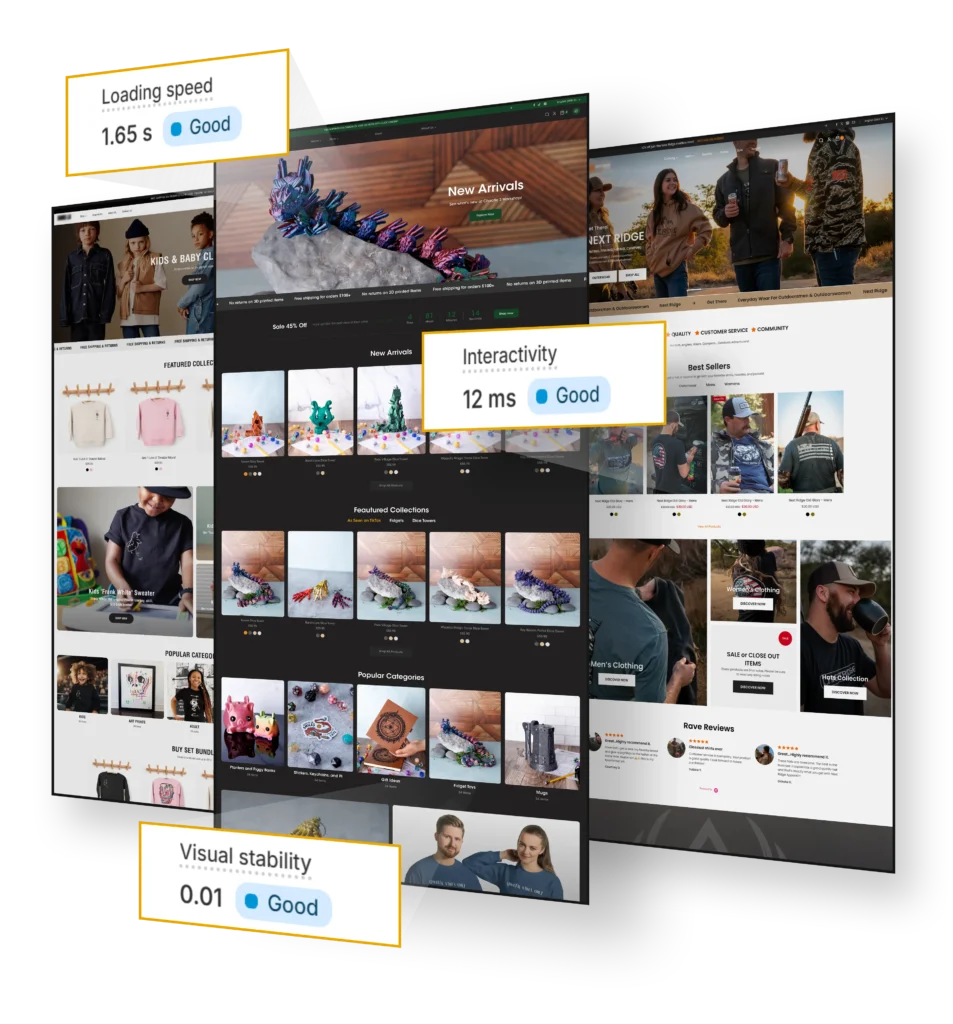
- Faster without the extra weight: Unlike heavy page-builder apps that inject their own scripts, section apps work within your existing theme architecture — helping you maintain good Core Web Vitals scores and page speed.
- Flexible as you grow: You are not locked into a fixed design. As your brand evolves, you can update layouts, test new section combinations, and iterate without starting over or hiring a developer.
- More budget-friendly: Instead of paying $3,000–$15,000 upfront for a custom build, you improve your store step by step at a fraction of the cost — keeping more budget available for marketing and customer acquisition.
4. The Comparison: All Three Options at a Glance
Rather than choosing between just two extremes, today’s Shopify merchants have three practical paths. Here’s how they compare across the metrics that matter most:
Feature | DIY (Free / Paid Theme) | Professional Shopify Store Design Service | Hybrid: DIY + Theme Sections App |
|---|---|---|---|
Setup Cost | $0 – $300 | $3,000 – $15,000+ | ~$20 – $100+/month (app subscription) |
Time to Launch | Days – Weeks | 1 – 3 Months | Hours to Days |
Design Quality | Template-level; depends on skill | Custom & branded | Professional, conversion-optimised |
Site Speed | Variable — slows down with extra apps | Highly optimised | Lightweight; no extra bloat |
Coding Required | None for basics; needed for advanced edits | Handled by agency | None — no-code editor inside Theme Editor |
Scalability | Limited to theme settings | High — built to spec | High — reusable sections across pages |
Trust & Credibility | Lower — looks like a common template | High — unique and branded | High — polished layouts, built-in trust signals |
Best For | Idea validation, tight budgets | Scaling stores with $20k+/month revenue | New merchants wanting pro results on a lean budget |
Key takeaway: For new merchants who haven’t yet validated revenue, the Hybrid approach delivers the best balance of speed, cost, and design quality. The DIY route works for tight-budget validation, while a Shopify store design service makes sense once your store is already generating consistent monthly revenue.
5. Decision Matrix: Which Option Should You Choose?
Your best choice depends on your current stage — revenue, budget, technical comfort, and urgency to launch. Here’s a data-backed framework to help you decide:
Criteria | DIY | Shopify Store Design Service | Hybrid (Sections App) |
|---|---|---|---|
Monthly Revenue | < $5,000 (validation phase) | $20,000+ (proven store) | $0 – $20,000 (growth phase) |
Available Budget | < $500 | $3,000 – $15,000+ | < $100/month |
Time Available | High (40+ hrs) | Low (outsourced) | Low–Medium (hours) |
Technical Comfort | Low – Medium | None needed | None needed |
Urgency to Launch | Medium | Low (1–3 months) | High (same day) |
Design Priority | Functional, not pretty | Fully custom brand | High — reusable sections across Professional without custom build |
Choose DIY if…
You’re in the product validation phase. At this stage, your primary goal is to confirm that real customers will pay for your product — not to run a polished brand experience. DIY gives you a working storefront without financial risk.
- You have more time than budget
- You’re comfortable learning and handling the technical setup yourself
- Your product is unvalidated and you need to move fast without financial risk
Choose a Shopify Store Design Service if…
Your store is already generating $20,000+ in monthly revenue and you want to maximise a proven product. At this revenue level, a 1–2% improvement in conversion rate — which a well-executed redesign can realistically deliver — can directly add $2,000–$4,000/month to your bottom line, making the $5,000–$15,000 investment defensible.
- Your business model is complex — for example, B2B portals, multi-currency wholesale, or custom subscription flows
- You have the budget and prefer to outsource the design and development process fully
- You need a fully bespoke brand identity that off-the-shelf sections cannot replicate
Choose the Hybrid (Theme Sections App) if…
You’re in the growth phase — you’ve validated your product, you’re getting orders, and you want a more professional storefront without committing to a major agency spend. This is the sweet spot for most new and early-stage Shopify merchants.
- You want a polished, professional look without a large upfront investment
- You want to move beyond the layout limitations of standard free themes
- You care about keeping your site fast and SEO-friendly without relying on multiple third-party apps
- You want the flexibility to improve, test, and scale your store over time without a developer
For example, a new merchant selling handmade skincare products used a free Shopify theme at launch, validated their first 50 orders, then used a theme sections app to add structured product story sections, ingredient highlight grids, and a testimonial carousel — all without touching code. Their store now looks comparable to brands spending thousands of dollars on design, at a fraction of the cost.
6. Final Verdict: What Actually Gets Better Results?
In the short term, a professional Shopify store design service can deliver faster, cleaner results — especially if you’re working with a complex business model or need a fully custom brand identity. But for most new merchants, it’s the wrong first step before product-market fit is confirmed.
In the long run, the most successful merchants are usually those who understand how their own store works and why it converts. Using a theme sections app like OT Section: Theme Sections gives you more than an upgraded look — it helps you understand the thinking behind effective page design, empowering you to test layouts, refine the customer journey, and scale confidently.
Strong results don’t come from spending more. They come from clarity, trust, and speed. And with the right building blocks — sections designed for real e-commerce performance — you can achieve that without relying entirely on an agency.